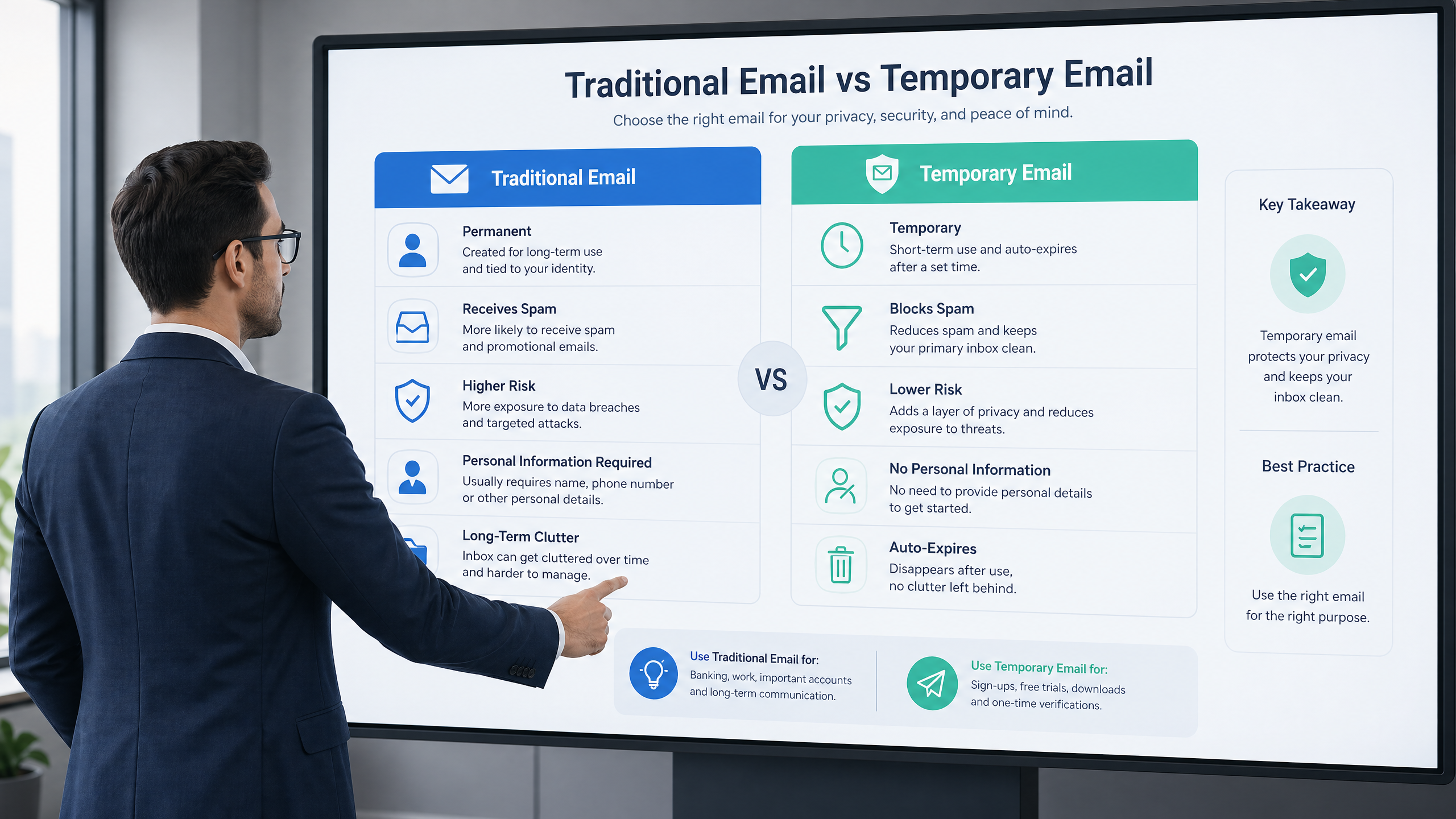
Email Types Comparison: Traditional, Temporary, and Disposable - Which One Suits You?
In our fast-paced digital world, email has become an essential communication tool, whether for personal, professional, or even service registration purposes. With increasing concerns about privacy and security, various types of email services have emerged, going beyond just traditional email. We now have Temporary Email and Disposable Email. What are the differences between these types, and when should you use each one?
1. Traditional Email
Traditional email is the most common type, which we use daily in our lives. Examples include Gmail, Outlook, Yahoo Mail, and others. This type is characterized by:
- Permanent Identity: Associated with a permanent personal or professional account, and used as your primary identifier on the internet.
- Long-Term Storage: Retains messages and files for long periods, making it suitable for important communications and documents.
- Reliability and Professionalism: Considered the gold standard for official and professional communication.
- Integrated Features: Usually comes with a calendar, contacts, cloud storage, and advanced security features.
When to use it?
- For important personal and professional communications.
- For registering with banking, government, or any service that requires a permanent and reliable identity.
- For communicating with family and friends.
- For managing your business.
Potential Drawbacks:
- Vulnerable to spam and phishing attacks.
- May lead to personal data leakage if the service is compromised.
- Difficulty in maintaining your privacy when registering on untrusted websites.
2. Temporary Email
Temporary email, also known as "fake email" or "10-minute mail," is a service that provides valid email addresses for a limited period (usually from 10 minutes to a few days). Its main goal is to protect your privacy and primary inbox from unwanted messages.
- Privacy: Protects your real identity from websites that require an email for registration.
- Spam Prevention: Prevents spam messages from reaching your primary inbox.
- Ease of Use: Does not require registration or a password in most cases.
- Limited Validity Period: The address and messages are deleted after a certain period.
When to use it?
- For registering on forums, blogs, or websites you don't fully trust.
- For downloading files or trying services that require a one-time email.
- To avoid unwanted promotional messages and advertisements.
- To test applications or services without revealing your real identity.
Potential Drawbacks:
- Not suitable for important communications or those requiring a permanent record.
- May not be accepted by some websites that detect it as a temporary email.
- Does not offer advanced features like a calendar or storage.
3. Disposable Email
Disposable email is a broader term that includes temporary email, but it can also refer to services that allow you to create unique email addresses for each use, which can be forwarded to your primary email and then "disposed of" (deactivated) at any time. The main difference here is that you control its validity period and it may be linked to your primary email.
- Greater Control: You can control the validity period of the address and forward messages.
- Source Tracking: If you start receiving spam on a disposable address, you can find out who leaked your email.
- Primary Email Protection: Your primary email remains protected from spam.
When to use it?
- When you need a unique email address for each service, but want to receive messages in your primary inbox for a period.
- To track who sells or leaks your email address.
- To register for services you might need to access later but don't fully trust.
Potential Drawbacks:
- Requires more complex setup than simple temporary email.
- May not be free for some services.
Comparison Table:
| Feature | Traditional Email | Temporary Email | Disposable Email |
|---|---|---|---|
| Identity | Permanent, personal/professional | Anonymous, temporary | Can be anonymous, temporary/semi-permanent |
| Privacy | Low (vulnerable to tracking) | High (protects your identity) | High (protects your identity and allows tracking) |
| Spam Prevention | Weak (receives spam) | Excellent (prevents spam) | Excellent (prevents spam and allows tracking) |
| Validity Period | Permanent | Limited (minutes/days) | Controllable (can be deactivated) |
| Registration Required | Yes, usually with personal info | No, or very minimal info | May require simple registration |
| Optimal Use | Important communications, business | One-time registrations, testing | Source tracking, primary email protection |
Conclusion
Choosing the right type of email depends on your needs and context of use. Traditional email is indispensable for important and professional communications. Temporary and disposable emails offer excellent solutions for protecting your privacy and combating spam in situations that do not require a permanent identity. By understanding these differences, you can make informed decisions to enhance your security and privacy in the digital world.